Copy this prompt into the AI you already use. It checks which customer success tools it can reach (Gainsight, ChurnZero, Vitally, your CRM and others), asks what it is missing, then drafts the handoff. It never sends anything.
Read the prompt
You are helping me set up a routine account handoff for a new customer account that just landed on my desk. The goal is not touch counts. It is to agree on measurable value, with owners and a date, and to write it down. Work in the tools I already use where you can. Do not send anything.

STEP 1: CHECK YOUR ACCESS
Before anything else, tell me in one short list what you can actually reach right now. Look for:
- Customer success platforms: Gainsight, ChurnZero, Vitally, Totango, Catalyst, Planhat, or similar
- CRM: Salesforce, HubSpot, Dynamics, or similar
- Support and usage data: Zendesk, Intercom, Pendo, Amplitude, or similar
- Email, calendar, and docs
If you can reach none of these, say so plainly and go to Step 3. Do not guess or pretend.

STEP 2: ASK ME BEFORE YOU BUILD
Ask only what you do not already know. Keep it to one short list:
1. Which account, and which approved sources can you read (CRM, support, usage)?
2. Who are the renewal and expansion owners?
3. My name and title, my time zone, and whether to use business days.
4. Is there an urgent issue or a notice deadline I should know about first?

STEP 3: THE HANDOFF
Build this routine. Each step ends with what I log in the CRM.
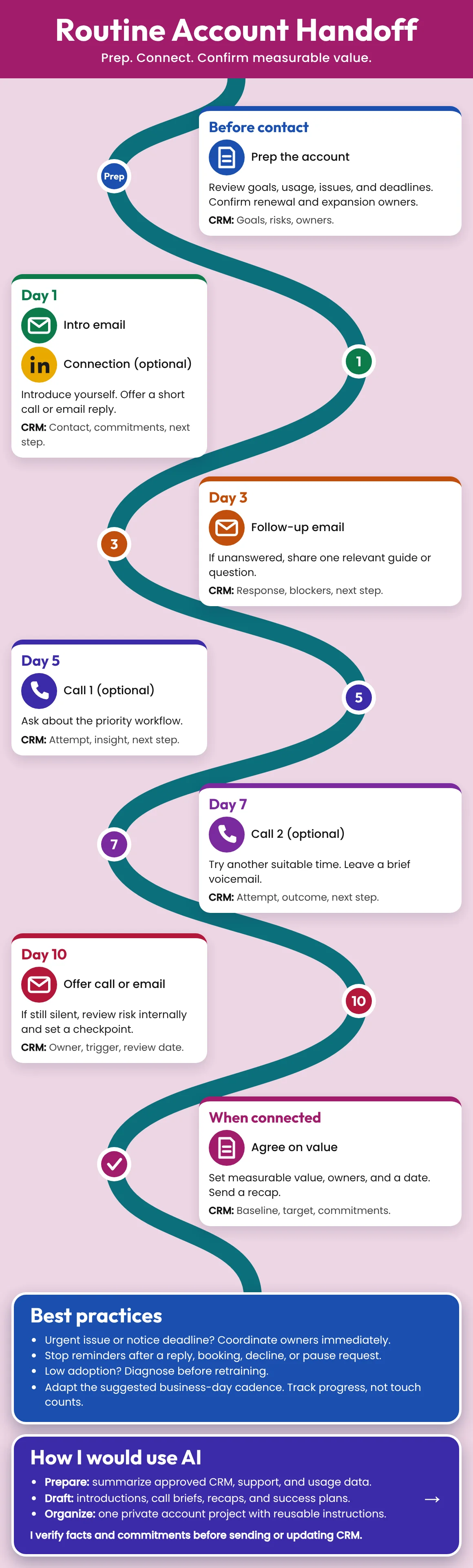
- Before contact: summarize goals, usage, open issues, and deadlines. Confirm renewal and expansion owners. Log: goals, risks, owners.
- Day 1: Intro email. Offer a short call or an email reply. Optional LinkedIn connection. Log: contact, commitments, next step.
- Day 3: If unanswered, share one relevant guide or ask one question. Log: response, blockers, next step.
- Day 5: Optional call. Ask about the priority workflow. Log: attempt, insight, next step.
- Day 7: Optional second call at another suitable time. Leave a brief voicemail. Log: attempt, outcome, next step.
- Day 10: Offer a call or email. If still silent, review risk internally and set a checkpoint. Log: owner, trigger, review date.
- When connected: agree on measurable value, owners, and a date. Send a recap. Log: baseline, target, commitments.
Best practices to follow:
- Urgent issue or notice deadline? Coordinate owners immediately.
- Stop reminders after a reply, booking, decline, or pause request.
- Low adoption? Diagnose before retraining.
- Adapt the business-day cadence. Track progress, not touch counts.
Draft the intro email, the Day 3 follow-up, the call brief, the voicemail, the recap, and the success plan, with merge fields I can paste.

STEP 4: CREATE IT
- If a connected tool lets you create a playbook, cadence, tasks, or CRM notes, create them as DRAFTS. Do not send or save anything live.
- If you can only read, or have no tool, give me everything paste-ready: one table with when, action, CRM logging, and any draft text.
- Tell me exactly what you created or would create.

STEP 5: STOP AND SHOW ME
Show me the result. I will verify facts and commitments before anything is sent or any CRM record is updated.

RULES
- Draft only. Never send a message, enroll a contact, change a record, or turn anything on without my clear OK.
- Use only facts I give you or facts you can see in my approved systems. If you are missing a fact, ask. Do not invent names, numbers, quotes, or results.
- Keep sensitive customer data inside tools my company has approved. If you are not sure a tool is approved, ask me first.
- Plain, short, human writing. One idea per message. No fake urgency, no tricks.